Sales Execution & Communication
Interactive Pricing Pages: Let Buyers Adjust the Quote Themselves
Static quotes force buyers to email you for every what-if. Learn how interactive pricing with adjustable quantities and plan cards shortens the pricing conversation.
6 min read

Tanner Randall
Founder, Kollab
Here is what happens to a normal quote. You send a PDF with a fixed total. Your buyer looks at it, thinks what if we only rolled out to one team first, and then does one of two things: emails you to ask, or quietly decides it is too expensive and stops replying.
Neither is good. The first costs you three days of latency. The second costs you the deal, and you never find out why.
The Problem With a Fixed Number
A static quote makes the buyer’s most natural next move — running a scenario — require you. Every question about seat count, contract length, or which tier makes sense becomes a round trip.
Meanwhile, the number they are looking at is the largest one you sent, presented without any way to explore how it changes. That is a poor position from which to start a negotiation.
What an Interactive Quote Changes
The buyer runs their own scenarios
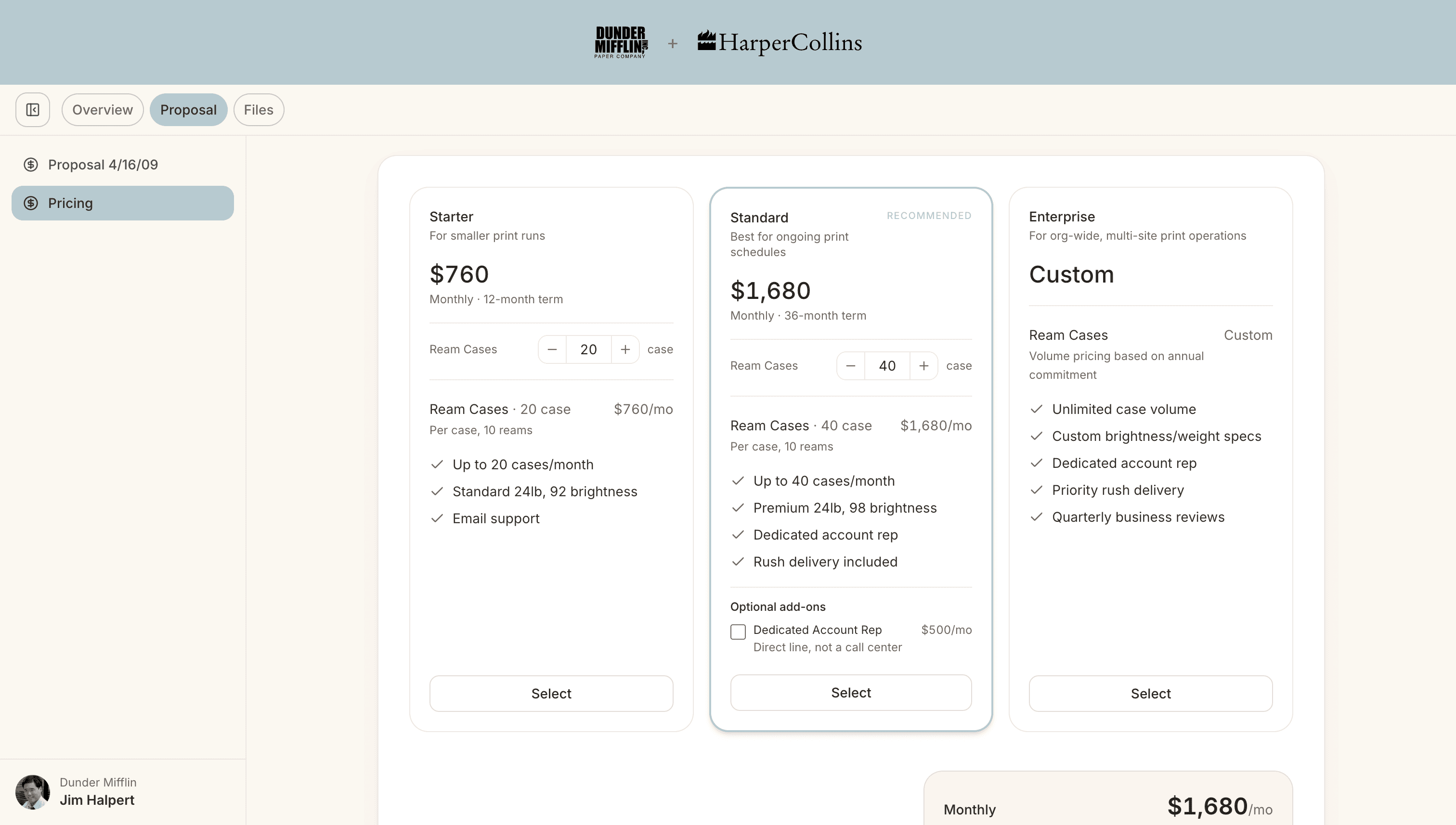
Put a quantity stepper on the seat line, bounded by a sensible minimum and maximum, and the buyer can model a ten-seat pilot against a sixty-seat rollout themselves. Totals recalculate live on the page. The question they would have emailed you gets answered in four seconds.
Plan comparison happens side by side
Three cards with a recommended badge on the middle one does more work than three paragraphs describing tiers. The buyer selects a card and every total follows their choice — the same mechanic they already understand from every pricing page they have ever used.
Monthly versus annual stops being a maths problem
A billing switcher above the cards lets them see both. If annual saves them eighteen percent, they discover that themselves rather than taking your word for it in a footnote.
Add-ons become opt-in, not upsell
Optional lines presented as tick-boxes — unticked, excluded from the total until selected — read as choices rather than padding. Buyers add things when adding feels like their idea.
What This Looks Like in Kollab
Kollab’s pricing section supports all of it: plan cards or line-item tables, a recommended plan that preselects in the total, monthly and annual switchers, contract-length switchers, buyer-adjustable quantities with live recalculation, optional add-ons, tiered block pricing, and discounts applied at the line or plan level.
Because pricing sits inside the workspace rather than in an attachment, two useful things follow. It updates in place when terms change — no re-sending a v3 PDF — and you can see in the engagement data how long the buying committee spent on it, which is usually the most informative number in the deal.
How to Build One That Converts
Bound the stepper honestly. A minimum of one and a maximum of ten thousand is not a decision aid. Set the range to the deals you actually want.
Recommend one plan. Three unlabelled options is a test. One marked recommendation is guidance, and buyers overwhelmingly take it.
Keep the priced lines to what is real. Descriptive claims belong in bullet points, not as zero-value line items that clutter the maths.
Say what happens next underneath. A quote with no next step is a document. Pair it with the shared plan so the price sits beside the path.
The Point Is Not the Widget
Interactive pricing is not about looking modern. It is about removing you as the bottleneck between a buyer’s question and its answer — which is the same reason the whole workspace exists. If you want the wider version of that argument, see why interactive proposals outperform static decks.
Give the buyer the controls. You will learn more from what they model than from anything they say on the next call.
Stop rebuilding the follow-up from scratch. Kollab keeps the plan and the collateral in one link that stays current between calls. Try it free — ten workspaces, no card.
Related reading
Async Selling: How to Run an AI Deal Workspace Without Constant Meetings
Ditch the 500-Word Post-Call Email: A Better Way to Follow Up
How to Turn a Gong, Fathom, or Fireflies Call Into a Buyer-Ready Action Plan