Kollab Product Guides
Tracking Engagement Analytics and Managing Notifications in Kollab
Use Kollab’s Engagement modal to track visitor behavior and configure personal notifications for real-time buyer activity updates.
3 min read

Tanner Randall
Founder, Kollab
Once you publish and send a Kollab workspace, you no longer have to guess whether your prospect opened your proposal or shared it with their team.
Kollab gives you real-time Engagement Analytics and customizable Notification Settings so you can follow up at the exact moment buyer interest is highest.
1. Viewing Room Engagement Analytics
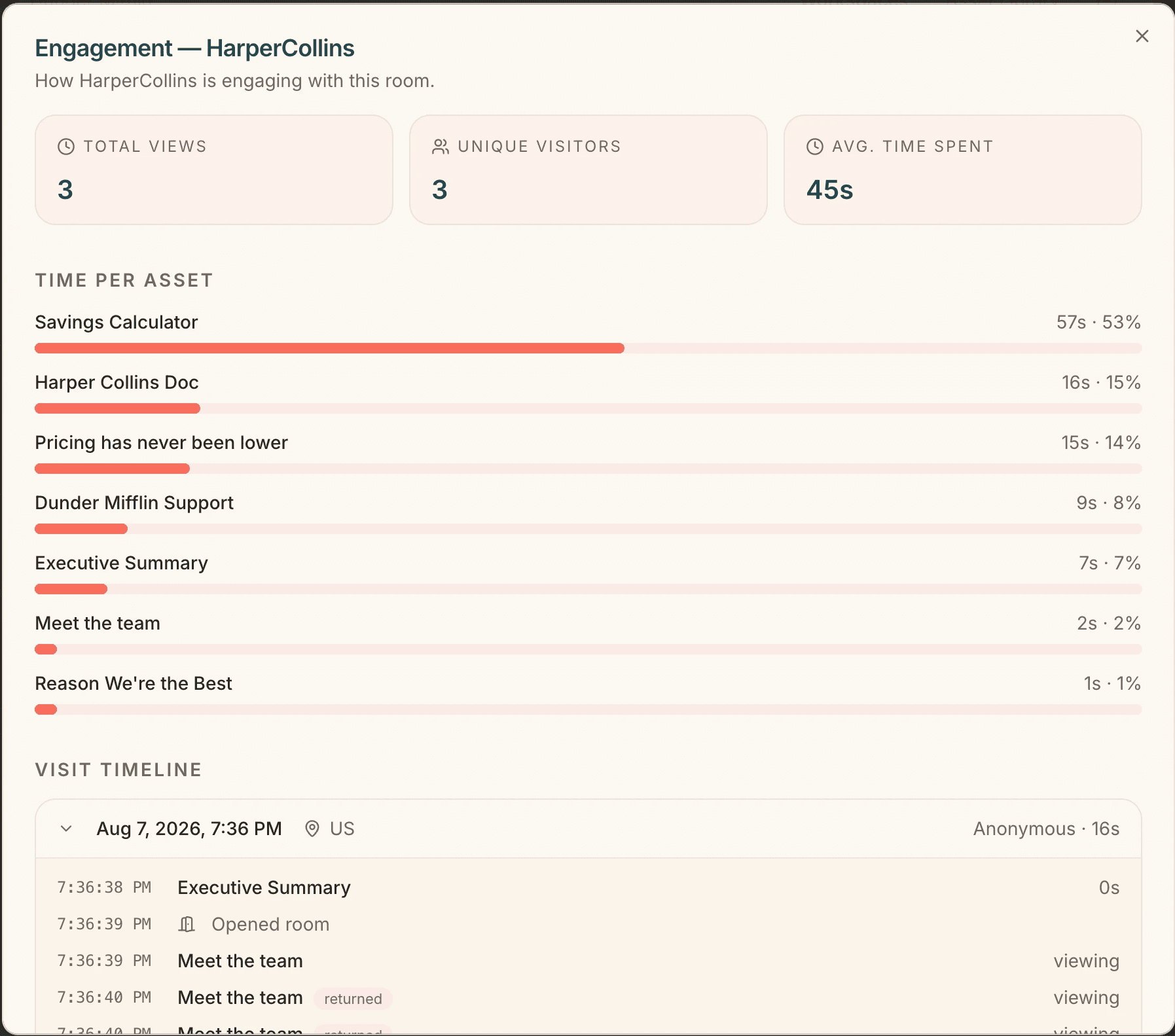
To see how prospects are interacting with your workspace, click the Analytics bar chart icon next to any deal in your Workspaces dashboard.
High-Level Room Metrics
At the top of the Engagement modal, you’ll see three core metrics:
Total Views: The total number of times your workspace link has been opened.
Unique Visitors: The total count of individual individuals who accessed the room.
Avg. Time Spent: The average duration buyers spend viewing your content during a session.
Time Per Asset
See exactly which materials catch your prospect’s attention—and which ones they skip:
Each asset lists total viewing time alongside its percentage share of total engagement (e.g., spending 57s / 53% on your Savings Calculator).
Visual progress bars show at a glance which documents resonate most.
Detailed Visit Timeline
Scroll down to the Visit Timeline for a live, second-by-second activity log. You can see timestamped events showing when visitors opened the room, navigated to specific assets (like Executive Summary or Meet the Team), or returned to re-read key sections.
2. Managing Workspace Notification Settings
Never miss a crucial buyer signal by setting up automated alerts for your personal account.
Navigate to Settings ➔ Notifications from the top header or side menu.
Configure your personal preferences for activity on rooms you create:
Workspace viewed: Toggle alerts on/off and choose frequency (e.g., Every view) to know the moment a prospect opens your link.
New buyer message: Toggle alerts on/off and set frequency (e.g., Every message) to get notified immediately when a prospect reaches out.
Click Save notifications to lock in your changes.
New to Kollab? The free plan covers ten workspaces with custom branding, mutual action plans, and engagement analytics. See what’s included — no card required.
Related reading
Customizing Workspace Layouts & Tab Groups in Kollab
How to Build and Publish a Buyer Room in Kollab (Step-by-Step)
Prompting for HTML Sales Collateral in Kollab: Best Practices & Examples